Outpatient (OPD)
OPD
Key features
Register new and returning patients, with automatic coverage checking
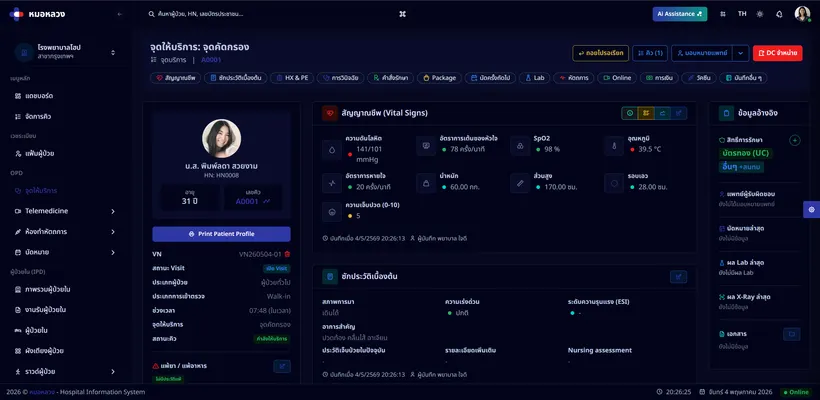
Record triage assessment and vital signs
Queue patients automatically by department and urgency
Hand the patient's details to the doctor workstation in real time
Track where each patient is (waiting → in consultation → lab → pharmacy → checkout)
Handle both scheduled appointments and walk-ins
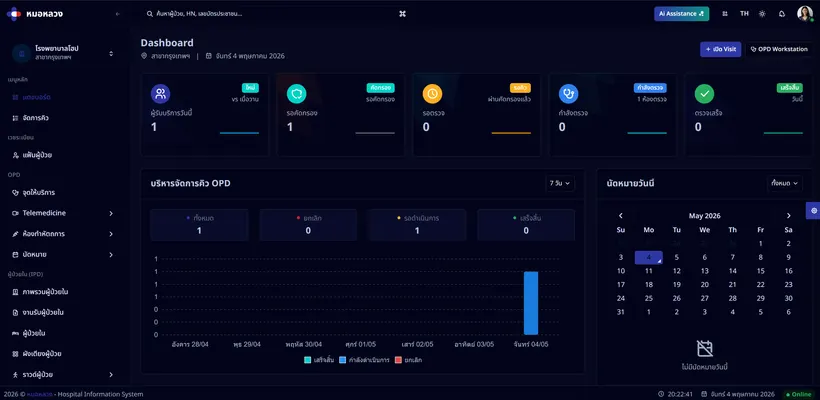
Dashboard of patient counts by status, department and coverage scheme
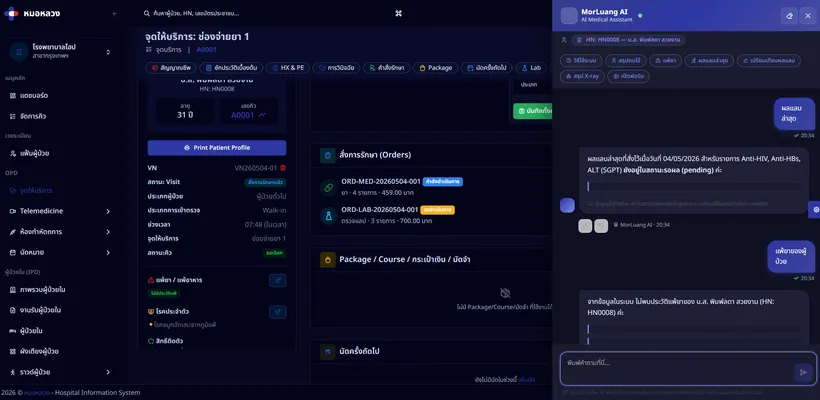
AI summarises the patient's history for the physician before the consultation
AI reports on daily patient volume and trends
Overview
The outpatient module is where a visit begins. It manages the flow from the moment a patient arrives until they leave — with every step recorded once and carried forward to the next.
Why it matters
Outpatients are the front door of any facility, and most patients start here. How well this module runs directly affects:
- How long patients wait — automatic queueing and instant handover cut idle time between steps
- How accurate the record is — details are captured once and flow to every other department
- How you plan staffing — a live dashboard shows the day’s load as it develops
How it connects
Details captured at registration are already on screen when the physician calls the patient. Orders the physician places route themselves to the laboratory, imaging or pharmacy. When care is complete, the charges gather at the billing desk with the patient’s coverage already applied.
Who uses this
Registration staffTriage nursesPhysiciansBilling staff
Related modules


Hospital information system software, licensed to clinics and hospitals in Thailand.